Lists
1. Introduction to Collections
The previous lessons have covered how to store and manage a single value in a variable. The following example illustrates how it is achieved.
>>> name = ‘Rohan’
>>> age = 20
Often solving problems demand multiple values to be stored in a single variable. Suppose you want to roll a dice n times and store its values. A straightforward approach is to use one variable per value of a roll as illustrated below.
>>> roll_1 = value_1
>>> roll_2 = value_2
>>> roll_3 = value_3
        …………………
>>> roll_n = value_n
However, this approach has several problems. First, what if you do not know the value of n beforehand. Assume you want to develop a program where users can store the goods they buy in a supermarket. One day they might buy 10 goods, and another day, they might buy 100 goods. Hence, one cannot decide in advance how many variables are needed. Second, what if the value of n is very large (e.g., n = 10,000). Creating and managing 10,000 variables is a difficult task.
Using container data types will solve these problems. Container data types allow storing more than one value in a variable. In the rolling dice example, using container data types, all the n values can be stored in a single variable. How to do that will be covered in Section 2. Python supports many container data types. Some of them are List, Tuple, Range, and Set. Note that there are many more. This lesson discusses the List in detail.
2. Introduction to Lists
List is one of the popular data structures. A list holds comma-separated values between square brackets. Following is a sample list in Python.
>>> numbers = [1, 2, 3, 4]
The above example clearly illustrates the structure of a list where the values are comma-separated and are surrounded by square brackets. More examples of lists in Python are as follows.
     >>> list_1 = [1, 2, 3, 4, 5, 6]
     >>> list_2 = [‘a’, ‘b’, ‘c’, ‘d’]
     >>> list_3 = [‘apple’, ‘orange’, 2000, 69.6]
These examples illustrate an important property of lists in Python which is that the values within a list need not be of the same data type. For example, in list_3, ‘apple’ and ‘orange’ are strings, 2000 is an integer, and 69.6 is a floating-point number.
3. Accessing Values in a List
A typical list will contain multiple values. To access the values in a list, the first step is to locate the values. Suppose you go to a library and you need to tell the librarian which book you need. Assume that the books are organized on shelves. First, you should specify the shelf where the book is located. Second, you should specify the location of the book on the shelf (e.g., the second book from the left). Accessing the values in a list is similar to that.
To locate the values in a list, the lists in Python are indexed. Consider the following Python list.
>>> values = [15, 20, 96, 32, 17]
Figure 1 illustrates how the above list is indexed.

Two important properties of indexing are,
- The index of the first value is 0 (not 1).
- In Figure 1, the first value 15 is indexed 0.
- The values are indexed from left to right
- In Figure 1, the first value 15 is indexed 0, the second value 20 is indexed 1, and the third value 96 is indexed 2.
The following Python code illustrates how to access the values in a list.
>>> values = [15, 20, 96, 32, 17]
>>> print(values[0])
15
>>> print(values[4])
17
In addition to accessing a single value at a time, Python also allows extracting a section of values from a list. The following code illustrates how it is achieved.
>>> values = [15, 20, 96, 32, 17]
>>> print(values[0:3])
[15, 20, 96]
>>> print(values[2:5])
[96, 32, 17]
It is evident from the above examples that if the specified index range is [m:n], the values considered are from index m to index (n-1). For example, values[0:3] considers the values from 15 to 96 where 15 is at index 0 and 96 is at index 2 (not 3).
4. Appending Values to a List
Consider the values list which was used in the previous sections.
values = [15, 20, 96, 32, 17]
To append 60 to this list, which means adding 60 to the end of this list, the append() method can be used. The following code demonstrates how the append() method is used.
>>> values = [15, 20, 96, 32, 17]
>>> values.append(60)
>>> print(values)
[15, 20, 96, 32, 17, 60]
The output shows that 60 has been appended successfully.
5. Updating a Value in a List
Consider the values list which was used in the previous sections.
values = [15, 20, 96, 32, 17]
Suppose we need to update the value at index 2, which is 96, to 60. It can be achieved in the following manner.
>>> values = [15, 20, 96, 32, 17]
>>> values[2] = 60
>>> print(values)
[15, 20, 60, 32, 17]
To update the value at a specific index, we write the name of the list followed by the index in square brackets on the left-hand side of the equal notation and the new value on the right-hand side of the equal notation (e.g., values[2] = 60).
6. Deleting a Value from a List
Consider the values list which was used in the previous sections.
values = [15, 20, 96, 32, 17]
Suppose we need to delete the value at index 1. It can be achieved using the remove() method as shown below.
>>> values = [15, 20, 96, 32, 17]
>>> values.remove(20)
>>> print(values)
[15, 96, 32, 17]
The output does not contain 20 which was the value at index 1. One drawback in using the remove() method is that the value at the specific index should be known. For example, in the above example, the remove() method cannot be used if we do not know that 20 is the value at index 1. In scenarios where the value at a specific index is not known, an alternative approach is to use the del (delete) keyword. See the following example.
>>> values = [15, 20, 96, 32, 17]
>>> del values[1]
>>> print(values)
[15, 96, 32, 17]
The del keyword does not need the value at an index to be known.
Practice Exercise 1
What will be the output when the following code is executed?
# Exercise 1
list = [‘ph’, ‘ch’, 1997, 2000, 2000, 2009]
list[2] = 2001
list.remove(2000)
list.append(2015)
print(list[2:])
7. Multi-dimensional Lists
Up to now, we only looked at one-dimensional lists where a list holds values within square brackets. Python allows the creation of multi-dimensional lists as well. Consider the following matrix presented in Figure 2.
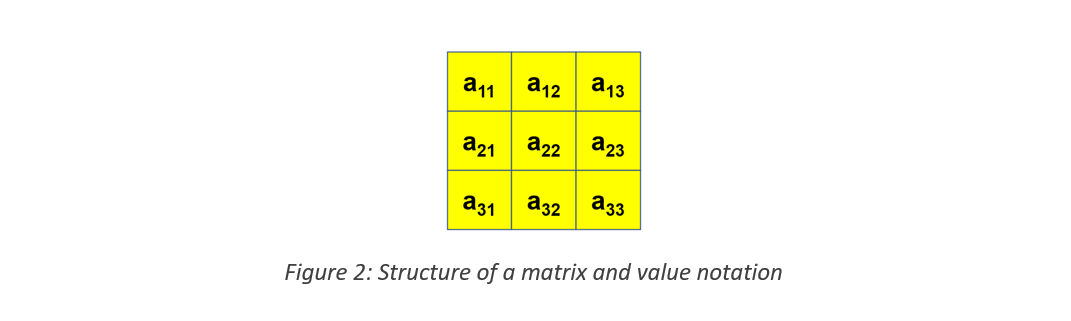
If you are unfamiliar with the concept of a matrix, consider it as a simple structure where values are stored in multiple rows and columns. A value in a matrix is denoted by amn where m is the row number and n is the column number (see Figure 2).

Using 2-dimensional lists is an easy approach to represent matrices in Python. The following is a 2-dimensional list that stores the matrix given in Figure 3 above.
data = [[1,1,1], [2,2,2], [3,3,3]]
There are three lists inside another list. Each internal list holds the values of a row in the matrix. For example, the first internal list contains the values [1,1,1] which is the first row in the matrix.
Accessing the values in a 2-dimensional list is similar to accessing values in a matrix. Suppose we want to access the value in the center square (a22). In the 2-dimensional list data, it is in the internal list at index 1 and inside that internal list, it is at index 1 again. The following code clearly illustrates how to access values in a 2-dimensional list.
     >>> data = [[1,1,1], [2,2,2], [3,3,3]]
     >>> print(data[1][1])
     2
Other list operations such as update, append, and delete also work in a similar manner. See the example below.
>>>  data = [[1,1,1], [2,2,2], [3,3,3]]
>>> data[1][1] = 25
>>> print(data)
[[1,1,1], [2,25,2], [3,3,3]]
>>> data[1].append(2)
>>> print(data)
[[1,1,1], [2,25,2,2], [3,3,3]]
8. List Operations
This section discusses some other common list operations.
- Length
To find the size/length of a list, the function ‘len’ (stands for length) can be used. See the following example.
    >>> len([1,2,3])
    3
The length of this list is 3 as the list contains 3 values.
- Concatenation
>>> a = [1,2,3]
>>> b = [4,5,6]
>>> print(a+b)
[1, 2, 3, 4, 5, 6]
Suppose there are two lists a and b. The contents of lists a and b can be combined using the plus(+) operator. a+b will output a single list with contents from lists a and b. In the output of the above example, values 1, 2, and 3 are from list a, and values 4, 5, and 6 are from list b.
- Repetition
The following code illustrates how repetition works.
>>> print([‘Hi’] * 4)
[‘Hi’, ‘Hi’, ‘Hi’, ‘Hi’]
Note that in the above example, multiplying by 4 does not create 4 separate lists but a single list where the contents of the original list are multiplied 4 times.
- Membership
Membership checks whether a value is available in a list. See the following example.
>>> print(3 in [1,2,3])
True
The ‘in’ operator is used to check membership. Statement ‘3 in [1,2,3]’ checks whether value 3 is available in the list. Since the value is available, it returns True. If the value is not available, it will return False.
- Iteration
Iteration means going through the list one element at a time.
>>> for x in [1,2,3]:
        print(x)
1
2
3
The first element in the list, which is 1 in the example above, will be assigned to the variable x. Then the print(x) statement will be executed. After that, the second value in the list, which is 2, will be assigned to the variable x. The print(x) statement will be executed again. This pattern continues until the last element in the list. It might not be very clear at this point. The concept of iteration will be discussed in detail in the next lesson.
9. Indexing and Slicing
We learned earlier that indices are required to access values in a list. This section summarizes indexing and introduces an alternative way of indexing called negative indices. Consider the list L=[‘a’, ‘b’, ‘c’]. Table 1 presents a set of Python expressions and their corresponding results that illustrate how indexing and slicing work.
| Python Expression | Result | Description |
| L[2] | 'c' | Indices start at zero |
| L[-2] | 'b' | Negative indexing is from right to left |
| L[1:] | ['b', 'c'] | Slicing extracts sections |
- Negative Indices
Figure 4 illustrates how the list L is indexed using normal indexing and negative indexing.

In negative indexing, the last value of the list is indexed -1, similar to how the first value is indexed 0 in normal indexing. The rest of the elements are indexed from right to left. In the given example, the last element ‘c’ is indexed -1, the next value to the left ‘b’ is indexed -2, and ‘a’ is indexed -3. Therefore, ‘print(L[-2])’ will output ‘b’.
- Slicing
Slicing means extracting a part of the list. We have learned about this earlier as well (in Section 3), but without using the term slicing. Using the range m to n within square brackets (L[m:n]) will consider the values from index m to index (n-1). In addition to what has been discussed in previous sections, the second part of the range is empty in L[1:]. It means from index 1 up to the last value of the list. Hence, L[1:] outputs the values ‘b’ and ‘c’.