
In this one I show you how to add a flag in your Dooplay theme (minimum version 1.1.9).
I will create here the flag and the language MULTI (for blueray type movies with multiple audio files of languages. For me English and French)
To start, we have to create the small flag with photoshop, Gimp or others montage software with dimmenssions 16 x 11px in .png format (for me multi.png)
As I am nice, if you want my flag it is disponnible here.
Then we will put our flag in our theme at the location: */wp-content/themes/dooplay/assets/img/flags/
Now let's make sure that dooplay recognizes the flag and assigns it to a new language.
To do this we will go to edit the file init.php (new file doo_player.php) which it finds in: */wp-content/themes/dooplay/inc/
At the very beginning of this file you should see:
// flags
function dt_get_player_language() {
	$idiomas = array(
		__('---------','mtms') => null,
		__('Arabic','mtms') => 'ar',
		__('Chinese','mtms') => 'cn',
		__('Denmark','mtms') => 'dk',
		__('Dutch','mtms') => 'nl',
		__('English','mtms') => 'en',
		__('English British','mtms') => 'gb',
		__('Egypt','mtms') => 'egt',
		__('French','mtms') => 'fr',
		__('German','mtms') => 'de',
		__('Indonesian','mtms') => 'id',
		__('Hindi','mtms') => 'in',
		__('Italian','mtms') => 'it',
		__('Japanese','mtms') => 'jp',
		__('Korean','mtms') => 'kr',
		__('Philippines','mtms') => 'ph',
		__('Portuguese Portugal','mtms') => 'pt',
		__('Portuguese Brazil','mtms') => 'br',
		__('Polish','mtms') => 'pl',
		__('Romanian','mtms') => 'td',
		__('Scotland','mtms') => 'sco',
		__('Spanish Spain','mtms') => 'es',
		__('Spanish Mexico','mtms') => 'mx',
		__('Spanish Argentina','mtms') => 'ar',
		__('Spanish Peru','mtms') => 'pe',
		__('Spanish Chile','mtms') => 'pe',
		__('Spanish Colombia','mtms') => 'co',
		__('Sweden','mtms') => 'se',
		__('Turkish','mtms') => 'tr',
		__('Rusian','mtms') => 'ru',
		__('Vietnam','mtms') => 'vn',
	);
	return $idiomas;
}
We will have to create a new language and give it the name of our flag image
Add the line of code: __ ('Multi Language', 'mtms') => 'multi',
In the list (preferably in alphabetical order)
You should have this:
// flags
function dt_get_player_language() {
	$idiomas = array(
		__('---------','mtms') => null,
		__('Arabic','mtms') => 'ar',
		__('Chinese','mtms') => 'cn',
		__('Denmark','mtms') => 'dk',
		__('Dutch','mtms') => 'nl',
		__('English','mtms') => 'en',
		__('English British','mtms') => 'gb',
		__('Egypt','mtms') => 'egt',
		__('French','mtms') => 'fr',
		__('German','mtms') => 'de',
		__('Indonesian','mtms') => 'id',
		__('Hindi','mtms') => 'in',
		__('Italian','mtms') => 'it',
		__('Japanese','mtms') => 'jp',
		__('Korean','mtms') => 'kr',
                __('Multi Language','mtms') => 'multi',
		__('Philippines','mtms') => 'ph',
		__('Portuguese Portugal','mtms') => 'pt',
		__('Portuguese Brazil','mtms') => 'br',
		__('Polish','mtms') => 'pl',
		__('Romanian','mtms') => 'td',
		__('Scotland','mtms') => 'sco',
		__('Spanish Spain','mtms') => 'es',
		__('Spanish Mexico','mtms') => 'mx',
		__('Spanish Argentina','mtms') => 'ar',
		__('Spanish Peru','mtms') => 'pe',
		__('Spanish Chile','mtms') => 'pe',
		__('Spanish Colombia','mtms') => 'co',
		__('Sweden','mtms') => 'se',
		__('Turkish','mtms') => 'tr',
		__('Rusian','mtms') => 'ru',
		__('Vietnam','mtms') => 'vn',
	);
	return $idiomas;
}
Save the file.
Then go to your site to check if your flag is well disponnible. To do this connect you on your administrator space and edit a movie.
In the options of the video player. Verify that your language has been added in the "Flag Language" menu (as in this image)

Now you have your new language and your new flag that should display like this on your website:
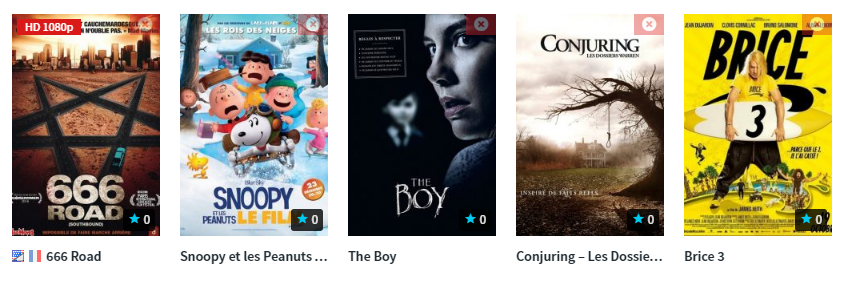
Already finished ! 
I hope to help you XOXO